iOS App FAQ
Updated 27-October-2026
This page provides answers to the most common questions about the IMDb Movies & TV app for iOS. If your question isn't answered here, head on over to the IMDb Support Community powered by Sprinklr, where other customers might be able to help.
Frequently asked questions
What does the IMDb Movies & TV app for iOS offer?
The IMDb Movies & TV app for iOS gives you access to our catalog of more than 22 million titles and more than 221 million cast and crew members, including celebrities, actors, actresses, and directors. You can watch trailers, exclusive interviews, and IMDb original videos.
Look up showtimes near you, buy tickets, and check out critic and user reviews. Get breaking entertainment news, and follow all of the latest awards and events. Sign in to track what you want to watch on your Watchlist, rate movies and TV shows you've seen, check in and share what you're watching, and set your favorite theaters.
Get notified about featured trailers, new movies hitting theaters, the latest entertainment trends, and awards and events news.
How is IMDb for iOS different than the regular IMDb website?
The iOS version of IMDb have access to all title and name pages. We offer our most popular data items in the app.
You can also sign in to rate movies and TV shows, manage your Watchlist, create and share lists, check in and share what you are watching, and set your favorite theaters.
Where can I download the IMDb app? Is it free?
The IMDb app is free. Visit the App Store on your device and search for "IMDb". Select and install the application titled "IMDb Movies & TV".
Is the IMDb app available internationally?
Yes, the IMDb Movies & TV app for iOS is available worldwide. App menus are available in English, Spanish, German, French, Italian, Portuguese, Japanese, Korean, Chinese and Brazilian Portuguese languages.
Is there an IMDb app available for Android or other phone platforms?
We also have an app for Android and Fire devices. Our mobile site, m.imdb.com, offers a fast way to get just the right amount of information on the go from other mobile devices.
Is an Internet network connection required to use the IMDb app?
Yes, the IMDb app requires an Internet connection as IMDb data is retrieved live from IMDb to ensure you're getting the most up-to-date information.
How do I sign in or create an account on the iOS app?
Automatic Sign-in with Amazon
If you have an Amazon account, you may be automatically signed when using the IMDb app. You'll receive a brief notification on your screen confirming you've signed in to IMDb via Amazon, with an option to sign out if you'd prefer.
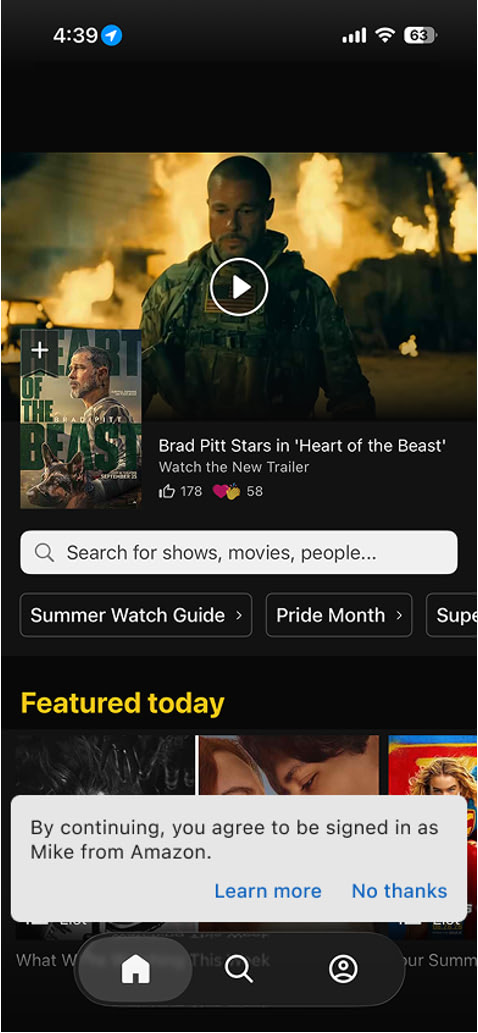
If you'd like to continue to sign in to IMDb with your IMDb account, tap Learn more then Sign in another way, and enter the email address associated with your IMDb account.
To learn more about Automatic Sign-in with Amazon, please refer to our guide.
Sign in manually
If you're not automatically signed in, you can sign in yourself:
- From the home screen, tap the profile button in the upper right corner of the screen.
- Tap Sign In / Create Account
- Tap the option you would like to sign in with (IMDb, Amazon, Google)
Where can I find my account User ID on the iOS app?
- From the home screen, select the "You" tab in the lower right corner.
- Go to Settings by clicking on the "gear" icon on the top right hand corner.
- Under "General", select "About".
- Your User ID will be listed next to Account.
Why can't I set my location on the IMDb app?
We currently support device location for countries where we have showtime listing for local theaters.
You'll be able to select your location for the following countries:
- Argentina
- Australia
- Austria
- Canada
- Chile
- Colombia
- Germany
- France
- Italy
- Mexico
- Spain
- New Zealand
- Portugal
- United Kingdom
- United States
What is Alexa+?
Alexa+ is your entertainment companion inside the IMDb app. Alexa+ is now built right into the IMDb app and lets you explore entertainment through natural conversation. You can use this AI-powered assistant to ask about movies, TV shows, actors, IMDb ratings, streaming availability, and more, all without leaving the IMDb app. To get started, tap the Alexa icon in the bottom navigation bar and start a conversation by typing questions or using your voice.
You can enable or disable the Alexa icon< in the IMDb app within your Settings.
To do this, tap the Profile icon in the bottom navigation bar, then Settings, and look for the Alexa option. From here, you can toggle the Show Alexa in navigation option on or off.
Once Alexa+ is enabled in your IMDb app, you can access additional Alexa settings in the three dots menu within the Alexa experience.
Disabling Alexa+ in the IMDb app doesn't affect other IMDb features.
For more information, visit Using Alexa in the IMDb App.